iPhoneAddict Apps
  • Accueil Apps
  • iPhone
  • iPad
  • Universelles
  • Mac
  • Apple TV
KG KultureGeek
App
iPhone / iPad Télécharger iAddict v5 Mac Télécharger iAddict Mac
  • Accueil Apps
  • iPhone
  • iPad
  • Universelles
  • Mac
  • Apple TV
  • Actualité Apple
  • Archives keynotes
  • Firmwares & iTunes
  • Contactez-nous
  • Comparateur de prix
  • KultureGeek
Accueil » Liste des Apps » Apps iPhone » Jeux » Nice Shots
L'application n'est plus disponible sur l'App Store français
1.3 iOS €Gratuit Iulai Baichurin 0 0 The procedure for using the application for the first time is as follows: 1. Launch the application 2. Give permission to use the camera 3. Press the button with the letter R (reload "weapon") 4. Using the button with the camera on it, you can...
Nice Shots

Nice Shots

iPhone / Jeux

Gratuit au lieu de 0,99€
Obtenir sur l'App Store

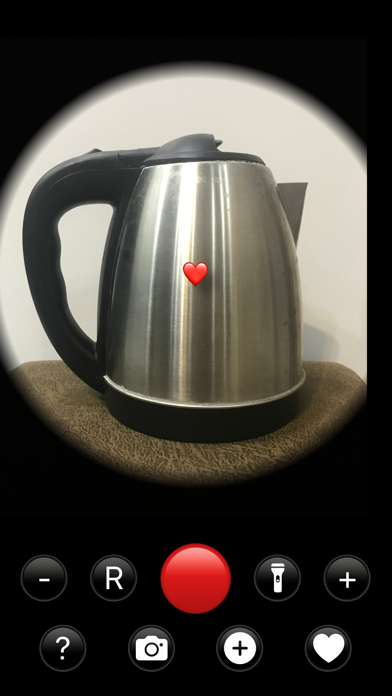
The procedure for using the application for the first time is as follows:

1. Launch the application

2. Give permission to use the camera

3. Press the button with the letter R (reload "weapon")

4. Using the button with the camera on it, you can choose whether the photos will be saved in the Photo Library or not. If the save photo mode is selected (in this case, the picture on the button is filled with white), after the first "shot" you will need to give the appropriate permission.

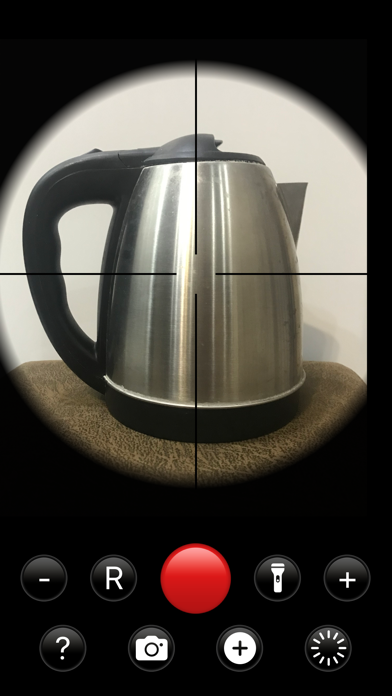
5. Point the camera at the target and press the red button to "shoot".
If you have allowed saving photos in the Photo Library, then simultaneously with the "shots" the pictures will be saved in the iPhone's camera folder.

The number on the reload button shows the remaining amount of "ammo". You can click on this button at any time.

You can change the scale with the plus and minus buttons.

To use the application in a dark room, press the flashlight button.

You can change the color of the crosshair by clicking on the cross button in the bottom row.

The bottom right button allows you to select a drawing to overlay on the photo - it will be either a bullet hole or a heart.

Clicking on the question mark button opens the app's website, where you can find the app's description, video, privacy policy, and contacts.

https://sites.google.com/view/nice-shot-app/home

En voir plus...

Quoi de neuf dans la dernière version ?

Added the ability to "shoot" with hearts, removed the image of the crosshair from the saved photo of the "shot".
  • Screenshot #1 pour Nice Shots
  • Screenshot #2 pour Nice Shots
  • Screenshot #3 pour Nice Shots

Note

(0 note)

Détails sur l'application

Version
1.3
Taille
2.2 Mo
Version minimum d'iOS
15.0
Game Center
Non
Dernière mise à jour
21/08/2023
Publié par
Iulai Baichurin

Newsletter App Store

Recevez chaque jour les meilleures promos

Actualité Apple

Image Résultats Apple T3 2026 : l’iPhone progresse, record du chiffre d’affaires
Résultats Apple T3 2026 : l’iPhone progresse, record du chiffre d’affaires
Image Séisme au Japon : Apple va faire un don aux secours
Séisme au Japon : Apple va faire un don aux secours
Image Les résultats financiers d’Apple aujourd’hui seront les derniers pour Tim Cook
Les résultats financiers d’Apple aujourd’hui seront les derniers pour Tim Cook
Image Ventes d’iPhone : Apple réalise son deuxième trimestre historique
Ventes d’iPhone : Apple réalise son deuxième trimestre historique
iPhoneAddict Apps

Le catalogue iPhoneAddict pour suivre les nouveautés, mises à jour et baisses de prix de l’App Store.

Apps

Toutes les apps iOS iPhone iPad Universelles Mac Apple TV

iPhoneAddict

Actualité Apple Archives keynotes Contact À propos KultureGeek

Suivez-nous

©2009-2026 i2CMedia. Tous droits réservés.