
Assets for Xcode
macOS / developpeurs
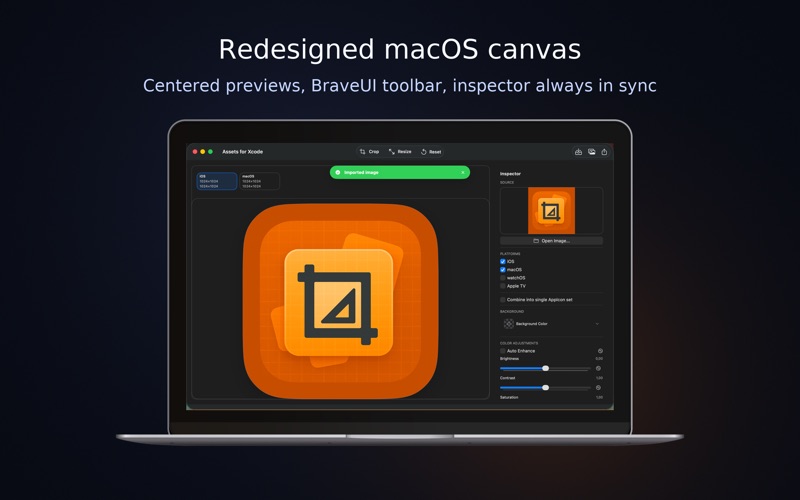
Assets for Xcode is the fastest way to turn a single 1024px icon into polished AppIcon catalogs for every Apple platform. The redesigned macOS experience keeps the live canvas, BraveUI inspector, and export pipeline perfectly in sync so you can drop artwork in, preview every platform, and ship with confidence.
• NEW in 5.0 – Sharper macOS canvas, centered previews, and a refreshed inspector that keeps platform toggles, adjustments, and background controls under one scroll.
• Multi-platform preview board – See iPhone, iPad, Mac, Apple TV, and watchOS mockups update in real time as you nudge sliders or change backgrounds.
• BraveUI color workflow – Anchored color picker with presets, gradient picker, and hex input plus a one-tap transparency swatch so icons always look right on light and dark UIs.
• Deterministic edits – Crop, Resize, Auto Enhance, and pro adjustments (brightness, contrast, saturation, warmth, vignette, fade, highlights, shadows, sharpen) always reapply to the pristine source image.
• Reliable import & export – Drag and drop, Finder, Files, or Photos all feed the same pipeline, and exports remember your last destination, generate perfect Contents.json files, and open the folder instantly on macOS.
• Built-in guidance – Tooltips, success/error toasts, and warnings for undersized art keep every run stress-free.
Tune once, preview everything, and deliver a production-ready AppIcon catalog in minutes.
Quoi de neuf dans la dernière version ?
5.0 update: a refined macOS experience with a sharper canvas, smoother inspector, and more predictable exports. Enjoy clearer multi-platform previews, improved background and color controls, more reliable import flows, and an updated export pipeline that remembers your last destination and opens it immediately after each run.